Using Your Vault
Right-click on the video to enable 'Show All Controls' to control the video volume and progress bar.
AdviserGPT onboards your uploaded files, extracts Q&A pairs, and builds your Vault index automatically. Onboard material to your Vault that will actually help you and your team respond to questionnaires.All materials uploaded are viewable by all users regardless of permissions including Research. All materials can be tagged based on the Tag Categories setup by your Administrator.
Adding Content to Your Vault
This is the only prep work needed before your first login. Upload in priority order—the quality of your Vault directly determines the quality of every AI-generated answer.
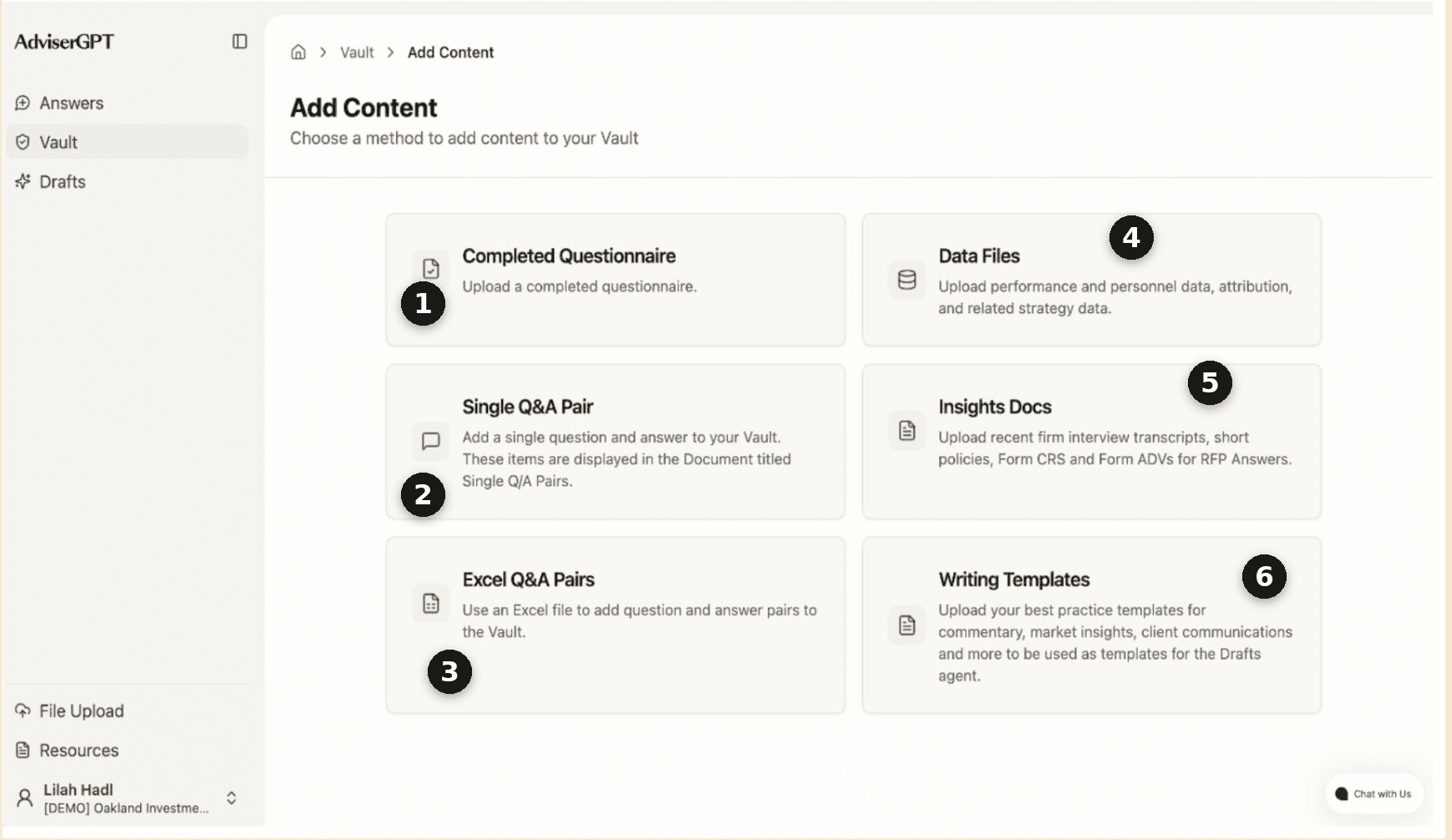
Completed Questionnaire (RFPs & DDQs)
Your most recent, fully answered questionnaires are the single most important input. Aim for 3–5 to start, with clearly paired questions and answers. For Microsoft Word and PDF files.
Examples: Completed RFPs, DDQs, ESG questionnaires, 15(c) responses
Single Q&A Pair
Add a single question and answer to your Vault. These items are displayed in the Document titled Single Q/A Pairs.
Example: Difficult image that would have to be uploaded separately with a corresponding Q&A pair (Pie charts, line graphs, etc.).
Excel Q&A Pairs
Helpful for Q&A templates made with Microsoft Excel Files. Use an Excel file to add question and answer pairs to the Vault.
Example: Spreadsheet of Q&A pairs
Data Files
Helpful for quantitative questions, adding a quarterly data file via our standard template ensures all data questions and tables can be automatically completed and updated.
Examples: Quarterly data file, about people/workforce, performance and AUM data, holdings, attribution, and related strategy data.
Insights Docs
Written prose files such as policy documents, interview transcripts, commentary , presentations, and other firm content that informs your RFP & DDQ responses. and other firm content that informs your RFP & DDQ responses. Use supporting materials like market commentary, investment policy, and firm overviews sparingly—too many can dilute response quality.
Note: For long Insights documents (more than 5 pages) with many charts, tables, and graphics, it is best to break the main document down into 2 or 3 documents instead of one large file.
Examples: Interview notes, Client FAQs, Market Commentary, Investment policy, Firm Overviews
Writing Templates
Helpful to inform the Drafts workflow. Writing templates are used to structure Draft communications.
Examples: Monthly recaps, weekly market recaps, client communications template, quarterly commentary.
7. Research (Informational Inputs)
These materials are used for Draft communications. Upload research, attribution files, AI meeting notes - any inputs that inform your Drafts communications and writing. File formats supported included PDF, MS Word, and MS Excel.